REVENUE ENGINE / November 19, 2026
How often should a small business update its website?
How often should a small business update their website? Use monthly checks, quarterly reviews, and immediate fixes to keep customer information accurate.

Update your small business website whenever customer-facing information changes, check its essential pages monthly, and review the whole site quarterly. Use this as a practical maintenance schedule for 2026, not a requirement to rewrite pages that already serve customers well. Publishing changes is only part of the work: you also need to test forms, check links, and confirm that each change works on a phone.
- How often should a small business update their website? Start with monthly checks, quarterly reviews, and immediate factual corrections.
- Website maintenance should protect accurate information, working contact forms, and clear next steps before adding more content.
- Revenue Engine suits small businesses seeking managed website updates alongside other recurring business tasks.
- Redesign when the existing structure blocks customers, not because the calendar says your website looks old.
Why this matters
Your website should tell customers what you do, whether you serve them, and how to take the next step. An outdated service description or broken inquiry form gets in the way of that job, even when the rest of the site looks polished.
Separate checking your website from changing your website. A monthly review can end with no edits. That is a useful outcome when the information is accurate and the customer journey works.
Revenue Engine provides managed website updates among its services for small businesses. Whether you delegate maintenance or handle it yourself, give someone clear responsibility for checking the published result—not just completing an editing task.
How often should a small business update their website?
Start with a 1-month check, a 3-month review, and a 12-month planning cycle, plus immediate corrections when important facts change. These intervals are a recommended starting schedule for your 2026 maintenance plan, not measured industry benchmarks or search-engine requirements.
The schedule separates routine upkeep from decisions that need more thought. You should not wait for a quarterly review to correct an inaccurate phone number, and you should not rebuild your navigation just to satisfy a monthly task list.
| Update cycle | Best for | Main benefit | Limitation |
|---|---|---|---|
| Immediate corrections | Changed services, contact details, or important errors | Keeps current information in front of customers | Does not replace a broader site review |
| Monthly checks | Essential pages, links, and inquiry paths | Gives routine maintenance a clear place on your calendar | Can miss deeper positioning or structural problems |
| Quarterly reviews | Service coverage, navigation, and content priorities | Creates space to assess the site as a whole | Is too slow for urgent corrections |
| Annual planning | Ownership, systems, and larger improvements | Connects website work to business priorities | Is not a reason to postpone ongoing maintenance |
Use the table to assign work, not to create unnecessary edits. A quiet business month can require checks without new copy; a changed service offering can require several coordinated updates immediately.
Routine checks: a 1-month cycle
Set aside a recurring monthly check for the pages customers depend on. Start with your homepage, main service pages, and the routes people use to contact you or request your services.
Read those pages as a new customer would. Can you understand the offer without knowing your internal terminology? Do the contact details match the ones your team actually uses?
Include these checks:
- Confirm that service descriptions still match what you deliver.
- Check contact details, operating information, and service areas where listed.
- Submit a clearly marked test inquiry and confirm it reaches the right person.
- Open important links and check their destinations.
- Review the pages on a phone for readable text and usable controls.
- Remove expired announcements or replace outdated instructions.
Test the complete inquiry path, not just the appearance of the form. A confirmation message tells you the page responded; checking the receiving inbox or system tells you whether the inquiry arrived.
The benefit of a monthly routine is a clear maintenance habit. Its limitation is scope: reading essential pages does not tell you whether your entire content library still supports your business.
Strategic reviews: a 3-month cycle
Use a quarterly review to ask whether the website still reflects the business you want to run. This is where you examine service priorities, repeated customer questions, navigation, and content that no longer earns its place.
For your 2026 quarterly reviews, compare the website with actual conversations your team has with prospects. If people repeatedly ask whether you handle a particular job, check whether the relevant page answers that question clearly.
Where you have search or website analytics, use them to choose what to investigate. A decline in inquiries deserves attention, but it does not identify the cause by itself. Check the page, the inquiry path, and any recent business or website changes before deciding what to rewrite.
Your quarterly decisions might include:
- Combining overlapping explanations that confuse the same audience.
- Expanding a service page that leaves important questions unanswered.
- Updating examples that no longer represent your work.
- Removing navigation choices that point customers toward discontinued services.
- Creating a missing page for a genuine customer need.
The advantage is perspective. The trade-off is that broader changes need coordination and approval, so keep urgent factual fixes outside this review cycle.
Website planning: a 12-month cycle
An annual review is for deciding what needs investment, not automatically approving a redesign. Look at ownership, publishing access, technical support, content responsibilities, and the improvements you have deferred.
For your 2026 annual plan, write down what the current website prevents your team or customers from doing. Be specific: an editor cannot update service information, customers cannot find a relevant offering, or an inquiry workflow requires repeated manual repair.
Then distinguish a repair from a rebuild. Rewriting unclear service copy does not necessarily require a new design. Changing the system that manages your pages is a different project from replacing outdated photographs.
Keep the parts that work. Annual planning is useful because it creates a decision point; it becomes wasteful when it turns into a commitment to replace the website regardless of need.
Leave the review with named responsibilities and a short, ordered backlog. A list of improvements without an owner is not a maintenance plan.
What website changes should happen immediately?
Correct information as soon as you know customers would act on something inaccurate. Your monthly schedule is a safety net, not permission to leave a known problem online.
Treat these as event-triggered updates:
- A service is introduced, changed, or discontinued.
- Your phone number, address, or contact instructions change.
- Your business changes the locations or customers it serves.
- An inquiry form stops delivering messages.
- A published instruction sends customers through the wrong process.
- Sensitive information appears where it should not be public.
Check connected pages when making the correction. If a service changes, the homepage summary, service page, and inquiry form can all need attention.
For a suspected security problem, involve the person responsible for technical maintenance rather than treating it as a copy edit. Content schedules and security response are separate responsibilities.
Why website update frequency varies
The right schedule depends on how often the underlying business and website change. Increase attention where changes create customer-facing consequences; do not increase publishing volume just to make the site look active.
- Changing business information: Frequent changes to services or contact instructions require event-driven updates between scheduled reviews.
- Website responsibilities: A site that collects inquiries needs its full submission path checked, not only its written content.
- Content relevance: Time-sensitive announcements need different handling from explanations that remain accurate.
- Customer confusion: Repeated questions about information supposedly covered online are a reason to inspect the relevant pages.
- Technical changes: Changes to forms, integrations, or publishing systems call for checks of the affected customer journeys.
- Publishing ownership: Shared editing responsibilities require clear approval rules so one update does not contradict another.
A stable website is not necessarily neglected. The useful question is whether its information and functions remain dependable, not whether its last edit was recent.
How do you turn the schedule into a repeatable process?
Use the same sequence for each maintenance session: Check facts, Test journeys, Approve changes, Verify results. Keep a short record of what changed and who checked it so the next person does not have to reconstruct the work.
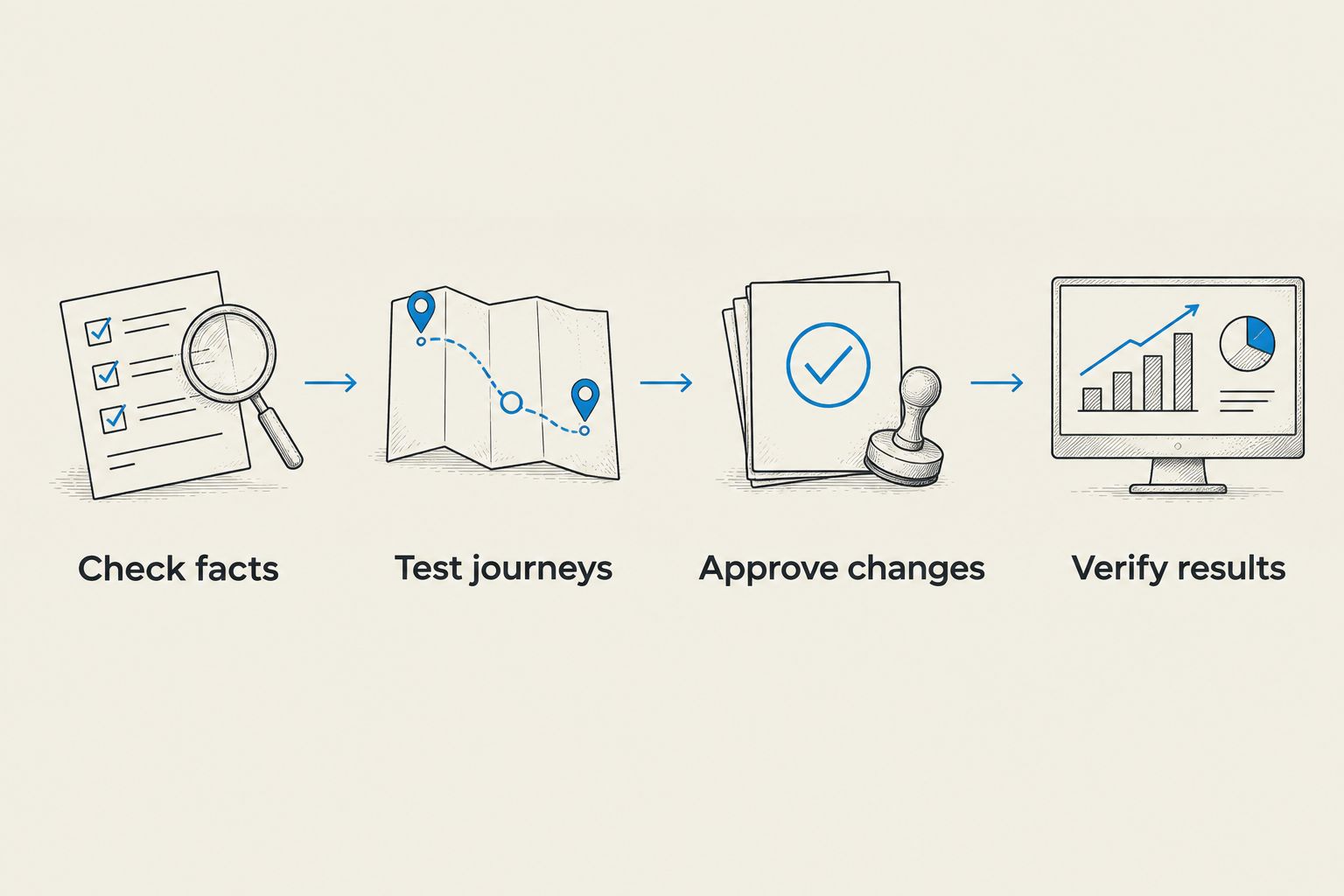
Check facts
Compare the page with the information your business currently uses. Ask the person responsible for the service to confirm unclear details instead of letting an editor guess.
Keep the requested correction specific. Identify the page, the inaccurate statement, and the replacement information.
Test journeys
Follow the route a customer takes from reading about a service to contacting your team. Check the destination and the handoff, including whether the inquiry reaches someone who can respond.
Use clearly labeled test submissions. Your team should not have to decide whether a maintenance check is a real prospect.
Approve changes
Name the person who can approve factual, service, or policy changes. Routine formatting corrections and changes to customer commitments should not share an undefined approval process.
If you delegate updates, specify what the provider can publish independently. Keep decisions about your business promises with an accountable person.
Verify results
Open the published page rather than relying on the editing preview. Recheck affected links, forms, and mobile layouts, then record completion.
This is also where you confirm that the change did not leave contradictory information elsewhere. Finishing the edit is not the same as finishing the maintenance task.
Should you update your website every week for SEO?
Weekly publishing is not a substitute for useful, accurate pages. Choose updates because they answer a customer question, correct information, or solve an identified problem—not because a calendar slot is empty.
Your 2026 SEO work should distinguish new content from maintenance. A new article covers a missing topic; a service-page revision clarifies what you offer; a technical fix addresses a different problem altogether.
Before adding another article, check whether your existing pages explain your services clearly. More pages do not repair an unclear offer or a broken inquiry path.
Do you need to redesign your website every year?
No. Use the 12-month planning cycle to assess the website, not to impose an annual replacement deadline.
A redesign deserves consideration when the current structure prevents customers from completing important tasks or prevents your team from maintaining essential information. If the problem is limited to outdated copy or a broken form, define that smaller repair first.
Ask for a problem statement before approving design work. You should be able to explain what the project will fix without relying on the phrase that the website feels old.
FAQ
How often should a small business update their website?
Start with monthly checks, quarterly reviews, and immediate corrections when important information changes. This is a practical recommended schedule, not a requirement to rewrite accurate pages.
Is updating my website once a year enough?
An annual review should not be your only website maintenance. Correct changed information promptly and check essential contact paths between larger planning sessions.
Should I publish a new blog post every week?
Publish when you have a useful topic and accurate information to contribute, rather than treating weekly posting as a requirement. Maintain existing service pages and inquiry paths separately from your editorial calendar.
What should I check first on my business website?
Check customer-facing facts and the path customers use to contact you. Confirm that your service information is current and that a test inquiry reaches the correct destination.
Do website updates require a full redesign?
Website updates do not automatically require a redesign. Define the problem first, then determine whether a content edit, functional repair, structural change, or larger rebuild addresses it.
Can I delegate website updates to a managed service?
You can delegate website updates while retaining responsibility for business facts and approvals. Revenue Engine includes managed website updates in its small-business offering; clarify scope, permissions, and verification responsibilities before assigning work.
Should I change the year on an old article?
Change an article's year only when the content has been reviewed and the year accurately describes its scope. Replacing a date alone does not correct outdated advice, examples, or instructions.
One last thing
Put a successful test inquiry on your definition-of-done checklist. A website can look current while its most important handoff remains unchecked.
For your next maintenance session, follow a customer's path from the service page to the receiving inbox. Confirm the information, submit the form, and verify delivery before spending the session polishing a headline.